Google+ reviews can be tough to get, and tough for customers to leave for you. Google sure doesn’t make the process as easy as it could be.
But if you really want to attract more customers through the local search results, you need to get Google reviews from current and past customers.
That’s why I’ve written this. There are business owners who know Google reviews are important, who want to follow Google’s rules, but who just can’t get any or many reviews from customers, for one reason or another. If you’re one of those people, this post is for you.
I’ve helped a lot of business owners get reviews, and I’ve seen many review-gathering efforts fail (and yes, I’ve had a hand in a few of those efforts, too).
This post contains everything I know about Google+ Local reviews.
Not only does it contain everything I’ve learned (that I can remember), but it will also include everything I learn from now on. This is an evergreen post. So I’ll update and tweak it over time, as Google’s review system evolves.
I’ve split it up into 6 sections:
The basics you must know about Google reviews
What most business owners don’t know (but should)
Best-practices for requesting reviews
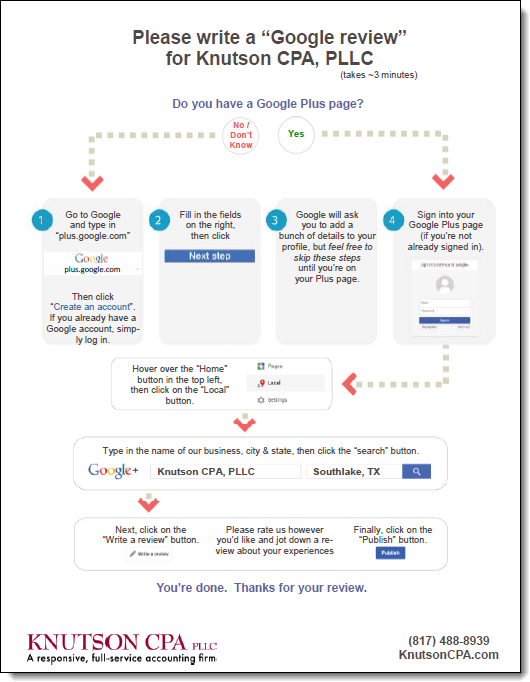
Examples of requests/instructions for writing a Google review
Or you can start right from the top:
The basics you must know about Google reviews
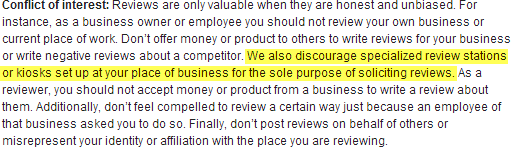
- YOU need to read and understand Google’s guidelines for reviews, as does anyone in your company who helps you ask customers for reviews. It takes a couple minutes to read them. They’re reasonably clear. If you have questions, you can ask me. But just read and follow the rules. Taking a couple minutes to do so can save you from serious heartache.
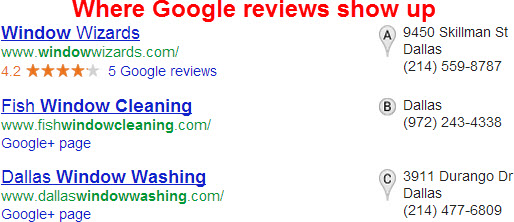
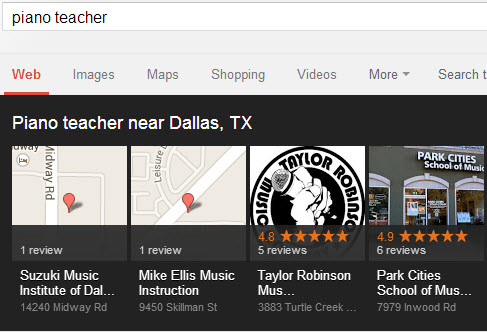
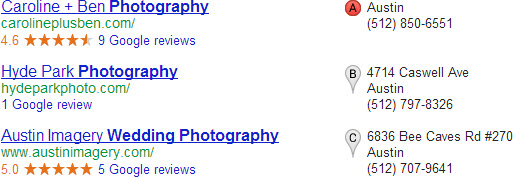
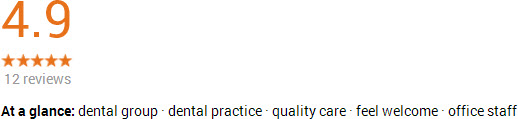
- You need to know what Google reviews look like in the main search results and in the “local carousel.”


- Reviews as a whole are one ranking factor of many. A competitor with no reviews or awful reviews may outrank you. But rankings are secondary: The real point of reviews is to give people a reason to click on your listing and then to pick up the phone or visit your website. A #1 ranking for a business with no reviews is a missed opportunity.
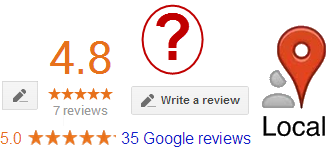
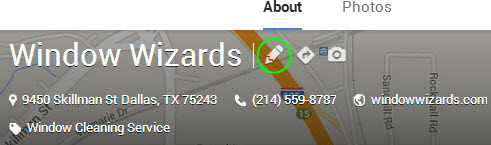
- Reviews can only be written on Google+ Local business pages, not on personal or on non-local-business Google+ page (more detail here). >If your page has the little “pencil” button near the top of the page, customers can write a review of your business on that page.

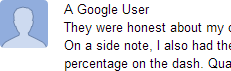
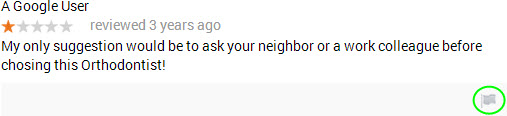
- Yes, customers must have Google+ accounts in order to write a review. Having a Gmail account isn’t enough (it needs to be “upgraded” to a Google+ account). That also means they can’t leave anonymous reviews; they need to be under customers’ real names. But if you see a review that is anonymous – that says from “A Google User” – then that means it was written before May 30, 2012 (when Google started requiring people to have Google+ accounts to write reviews and to have their names on reviews they’d written in the past).

- Customers need to post the reviews themselves, through their Google+ accounts. It’s not OK with Google if you transcribe and then post the kind words a customer has lovingly sent to you in a perfumed letter – even if it’s fine with your customer.
- Google has “filters” that are meant to prevent spammy or shill reviews from being posted. But, like many other things Google has created, it only halfway works at the moment (and sometimes fails spectacularly). It’s slowly getting better, but a lot of garbage reviews still make it through, while too many legit reviews still get filtered.
- A few of the factors that matter to the “review filter” seem to be: whether customers try to post reviews at an unnatural pace, how many reviews a given person has written previously, the wording of the review, and the user’s location (IP address). We don’t know exactly what factors Google’s review filters consider, or which matter the most. But the main thing you need to know is that Google has the facts on your business’s review-gathering activity and each customer’s review-posting behavior – and Google can take all of it into account when deciding which reviews to toss versus keep. (For more on how to keep your reviews out of the filter, see my checklist.)
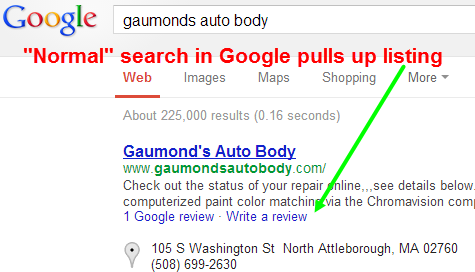
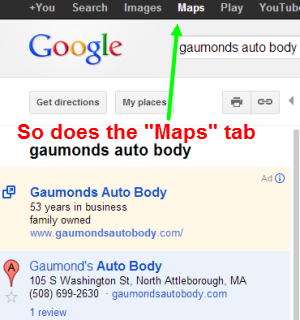
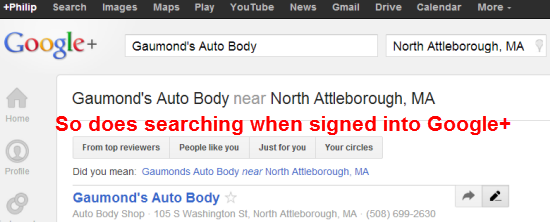
- There are several ways to navigate to your Google+ Local listing on a desktop, laptop, or tablet: People can perform a normal search in Google, they can go through the “Maps” tab, or they can use the two search boxes in Plus.Google.com. There is no one “right” way. You just have to find out from your customers what they find easiest. I’ve found that the easiest is to have customers search for your listing from within Plus.Google.com (once they’ve signed in or created their Plus account), because that’s where they’ll end up anyway to review you.


- iPhone/iOS users need the Google Maps app to write a review, and they must navigate to your listing through the app. Even if they have the app, they won’t see the “Write a review” button on your Google+ Local listing if they navigate to it through their mobile browsers or by scanning a QR code.
- Customers can leave ratings without actually writing a review. The rating is just the “stars” without the text of a review. Some people will do this, and although it won’t hurt you, you shouldn’t encourage it. You want potential customers and Google to have the benefit of reading at least a couple lines on your business and on what makes you better than the next guy or gal.

- Your customers’ “friends” – the people in their Google+ “Circles” – may see you in their personalized search results as a result of your customers’ reviews. To the extent your customers’ friends live or work near you, you’re probably reaching a few more potential customers.
- Google doesn’t set a minimum or maximum word count on reviews. They can be as long or as short as your customers would like. Nor have I found that Google is more likely to filter out one length of review. My rule of thumb is that one small paragraph is a great length for a review.
- Customers don’t have to have their photo show up next to their reviews, if they don’t want theirs to; if they don’t add a photo to their Google+ profiles, none will show next to their reviews.

- Google has rules against cross-posting – that is, copying a Google review and pasting it onto your website or onto another review site (e.g. CitySearch). If you try to build a clone army out of your Google review, it may be removed, and your clone army will wander around without a Fearless Leader.

- Google is constantly changing. Its policies, its staff, and its technology. The difficulties in getting reviews change from year to year. The only way to make it pay off long-term is to know and follow Google’s rules and to spend a few minutes every now and then reading up where you can (as you’re doing now).
What most business owners don’t know (but should)
- You shouldn’t focus solely on Google+ Local. You need reviews on a diversity of sites. Give people options, and don’t push everyone toward the same site.
- I’ve always found that reviews are a huge boost to your Google+ Local rankings, but the rankings benefit probably is more indirect than direct.
- At least in terms of rankings, the number of reviews you have seems to matter more than the quality of those reviews (i.e. whether your average “Zagat” rating is 9/30 or 29/30).
- It takes 4-5 reviews for your “review stars” to show up in the search results.

- If you see a review you don’t like – on your page or on a competitor’s – pretty much all you can do is flag the review and report it to Google. The review may be a pack of lies, but there are not (as far as I know) human editors to whom you can appeal. There is no Supreme Court here. Google won’t grant exceptions (again, as far as I know).

- Google seems more likely to filter the reviews of businesses in certain industries than in others – particularly car dealerships and (in my experience) businesses that travel to customers.
- Reviews can vanish and then return. They never seem to go away for good. For instance, sometimes Google will temporarily lose many or all of your reviews – but then they might show up on your page again a few days later. Google seems to mothball them away, rather than snuff them out completely.
- On the flipside, your reviews are never “safe.” They can be thrown out even after having been on your Google listing for years. This means, for one thing, that you should not focus exclusively on Google reviews. It also means that if you cut corners in any way – which you shouldn’t do in the first place – even reviews that don’t get filtered may get the axe later.
- There’s no “reputation-management” service that can ensure your customers’ reviews won’t get filtered by Google. Anyone who claims “We’ll get reviews from your customers and make sure they show up on Google” is lying. There is no such trusted source that would allow Google’s little Algorithm Elves to say “Yep yep, another one from 5StarzGuaranteed.biz, let it on through…keep ‘em coming, you slackers!”
- Probably the worst thing about duplicate Google+ Local listings is that they can split up your reviews. In terms of your review “health,” two listings will weaken each other like Siamese twins. If you have 10 customer reviews and 2 identical or near-identical Google listings, it might be the case that one listing has 6 of the reviews and the other has 4. It’s better for all your reviews to be marshaled behind one listing that would get all the rankings benefit of those reviews, rather than have two listings that sorta-kinda benefit from a smaller number of reviews. Also, with multiple listings, it’s harder to create a “wow” effect in the eyes of potential customers than if you had one listing with a ton of Google reviews.
- Google extracts the little “At a glance” snippets come largely from what customers write in your Google reviews.

- It’s possible to have an “average rating” that’s slightly lower than 5.0 even if you have nothing but 5-star reviews. (See this great comment by Mike Blumenthal on a post I did.)
- Google seems to mothball reviews. They don’t disappear forever – even if they’ve been filtered before ever making it onto your Google+ Local page publicly, or if they’ve been on your page for a while and then thrown out post facto, or if Google has accidentally “stuck” your reviews on another business’s listing.
- If you relocate and open a new Google listing, you may be able to get your old reviews moved over to the new listing, but it’s not a sure thing.
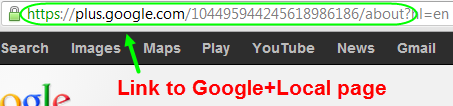
- You can’t copy and paste your Google reviews and put them on your website, but you can take a screenshot of them and put the screenshot on your site, if you were so inclined. It’s also fine to link to your Google+ Local page from your website, but because you don’t want to shuttle people off of your website once they’re there, at least have the link open in a new browser tab.
- There are “Top Reviewers,” whose reviews Google “trusts” more than those of other people. Reviews by these people may help your rankings more than will reviews by other people.
- Businesses can review each other. This can be a good way to scare up some more reviews. David Mihm has talked about this strategy ever since it became possible, and it’s a smart one. (You can see a real-life example of this in a comment on a post of mine from last year, courtesy of Eric Marshall of ZCreative.)
- A review is not the final word. You can and should write responses to the reviews, both good and bad. When appropriate, you also can and should get in touch with customers who may have written a harsh review and simply ask – if it’s not clear to you already – exactly how you can improve. Don’t ask for them to delete or change their reviews; just ask for feedback. Many people (like me) respect and are impressed by that sort of thing. )There’s also maybe a 10% chance they’ll edit or take down their review spontaneously.
Best-practices for requesting reviews
- Ask everyone for a review, not just your diehard, happiest customers. Asking for a review should be like handing out your business card: something you do impulsively, almost without thinking. Doing it in fits and starts doesn’t work. You need to ask a constant stream of customers on an ongoing basis – never too many or too few at one time. Otherwise, Google and other sites may filter lots of your reviews, and (worse) getting reviews will just become another nagging to-do item that you’ll only get to when you “have time.”
- Don’t insist that people write you a review on Google+ Local, to the exclusion of other sites. Convey to your customers that although you always like Google reviews, it’s great if there’s another site they’d prefer to review you on. This gets back to my earlier point about how you need reviews on a diversity of sites. Asking about 50% of your customers for Google reviews is a solid policy, in my experience.
- Point out as often as possible that you’d like your customers’ honest feedback. Having perfect 30/30 ratings is nice, but sometimes it can look fishy – to Google and (more importantly) to potential customers. You can use reviews as a way to look perfect when you’re not, or you can use them as an opportunity to learn about where you can improve. Your choice.
- Don’t tell people to leave a specific rating (e.g. “Excellent” – which is the equivalent of what used to be 5 stars). I understand the temptation. But most people are generous spirits, whom you won’t have to grease up in order to elicit a good word. And if they’re not raving fans, there’s a good chance they’ll say why they aren’t – which means an opportunity for you to up your game.

- Don’t ask a bunch of customers at once to post reviews. It should be as close to real-time as possible – right after the “transaction” (for lack of a better word).
- Expect a few lukewarm reviews or stinkers (or both). They’re inevitable. Even if they weren’t, getting a few harsh reviews is a small price to pay for getting your biggest fans to speak up.
- Don’t urge customers to use a specific device (e.g. smartphone) to post reviews. They can and should use whatever works best for them.
- Do not tell customers what to say in their reviews. Just let them know that although more detail is always great, short reviews are also OK. And don’t tell them to mention certain keywords. That very well could backfire and leave you with filtered reviews.
- Don’t incentivize. Not only is it against the rules, but makes you look as though you’re desperate. (Maybe you are desperate, but at least don’t show it blatantly.) Worst of all, it actually can rub some people the wrong way. Many people like feeling as though they’re granting a favor to someone, and would prefer not to feel like their words are being bought. (This ties in with a great talk by Dan Pink – not to mention one of his books, Drive.)
- Don’t get greedy and insist that any one customer review you on more than one site. For one thing, you don’t want that person to reuse the review he/she wrote you on Google+ Local and use it somewhere else, or vice versa. You also don’t want reviewing you to seem like a big, multi-step chore. If a customer wants to, that’s awesome. You both must be happy. But don’t push it.
- Get a general sense of how many Google+ Local reviews your local competitors have, and how often they seem to get them from customers. That gives you a sense of what the “bar” is in your local market, and the extent to which reviews are even a differentiating factor between you and your competitors: Businesses in some industries just don’t get reviews, for one reason or another. Don’t bust your butt to get 2 reviews each week if your competitors only get 2 reviews a year.
- When possible, try not to give customers the direct link to your Google+ Local page. Google most likely knows the referring URL – the page your customers were on before they came to your business’s listing. It’s also likely that Google will start filtering some reviews if it looks as though nobody’s writing them spontaneously and as though you’re pressuring them.

- Do NOT delegate the requesting of the reviews to someone out-of-house. It’s fine if your employee or receptionist does it, but it’s best for the head honcho to be the one to ask.
- Respond to reviews – and not just the negative ones. You don’t want it to seem as though the only way to get your attention is to slam you.
- You should ask customers for reviews using several different media. Not just verbal, not just email, not just my handouts. Test out which ones seem to work best, and use those. (Notice how I used the plural – “ones” and “those”?) Some excellent tools are GetFiveStars, Grade.us, and BrightLocal’s ReviewBiz.
- If you’re shy about asking for a review verbally, it might help to have some printed request and/or instructions. Even if it’s a worthless prop, it helps to have a show-and-tell piece. It can do a little of the work in explaining what it is you’re asking for. And it can take your customers’ eyes off of you for a second – which is a relief if you feel as though they’re staring holes into the back of your skull while you’re trying to explain what a Google+ Local page is and why you’d like a review there. You could probably do this by whipping out your phone, too. Whatever you like. Physical doo-dads make us feel less awkward; that’s at least one reason there are drinks at parties, and I’m guessing that’s at least one reason the podium was invented for speakers. Figure out what makes you feel less shy – but if you use shyness as a reason not to ask for reviews, the loss is yours.

- You need a backup plan for situations in which customers try to write you a Google review but they get filtered out for no apparent reason. If they’re willing to review you elsewhere, great. But if not, be sure to say that it’s OK for them to add your business to “Circles,” or to write down a testimonial that they wouldn’t mind your posting on your site.
- Know how to tell whether a review has been filtered. A customer’s review has been filtered if he/she is signed into Google and can see it on your Google+ Local page but neither you nor anyone else can see it on your Google page.
- Do not stop asking for reviews. Ever. Even if Google throws out some (or all) of your reviews for whatever reason, try to figure out why they might be getting filtered. But keep grinding away.
- You will not bat .1000. Probably not even .500. Not everyone you ask will remember or bother to write you a review. Some who try will have their reviews filtered. Some who try and succeed will write a review you don’t like. But so what? You’ve built a business. That’s much tougher than pulling together some reviews. Granted, it’s tough – but so is everything else that’s worth your time and effort. You can do it.
- Beware of what I call the “kitchen table effect” – where your request for a review sits on the place where your customers sometimes eat dinner with their families but more frequently pay bills and pile junk mail. Some people will need to be asked more than once to review you. And it’s OK for you to ask them more than once – just to remind them in a friendly, oblique way. Even that won’t always work, but sometimes you’ll be pleasantly surprised.
- Some (or many) first-time reviewers’ reviews will get gobbled by Google’s anti-spam K9 unit. There’s not much you can do about this, other than (1) to avoid asking a bunch of customers at once for a review, (2) to encourage honest reviews over unnaturally glowing reviews, and (3) to let customers know that their reviews don’t have to be of a certain length. (More tips here.)
- If you’re giving instructions to people who don’t have Google+ accounts, don’t tell them first to find your Google+ Local listing and then to sign up for a Plus account. It’s usually much easier the other way around. Some people say to me, “But Phil, if you just type our name into Google, our listing is right at the top. Isn’t that the easiest way to find our page?” To which I reply “Yes, but if some of your customers don’t have Google+ accounts, they’ll be prompted to create one and will have to search for your listing a second time before they can review you.” The other issue is Google sometimes won’t show your Google+ Local listing at the very top of the search results, even if you search for it by name. Google often reshuffles the rankings. An easy way to find your listing today might not be as easy tomorrow. The bottom line is you should only ask customers to go to your Google page after they’ve got a Plus account.
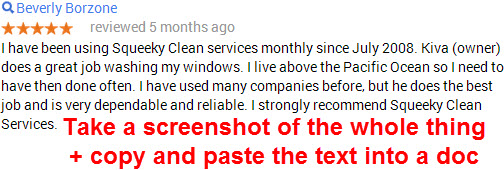
- Save each review in two ways: (1) copy and paste the text of each review into a document that you’ll be able to dig up easily later, and (2) take a screenshot of each review a customer has left on your page. You do NOT – and never will – “own” your Google reviews. But at least this way you post them as testimonials on your website if it comes to pass that your reviews get filtered and you’re convinced they’re not coming back.
- Your customers care. Not all of them, sure. But that’s OK. Many will write a review if you ask and if you maybe give them basic instructions as to how. Don’t assume that you have to wave a Starbucks card in their faces in order for them to do good deed.
- Review-gathering can (and should) serve as a mini-diagnostic of your entire business and your practices. For instance, if all your customers say they’d be happy to write you a review but none follows through, that might tell you that your customers don’t have as close a working relationship with you as they should. Or if you’re consistently at 4 stars, and nobody’s angry with your service but nobody loves it, that might tell you something else. Your reviews don’t just tell potential customers about your business; they can tell you about your business.
Examples of requests/instructions for writing a Google review:
A great video by Susan Walsh of ElSue.com:
From BarbaraOliverandCo.com (Mike Blumenthal’s flagship client):
From Yours Truly (click image to see full PDF):
(By the way, I can custom-make a review handout (like the above) for your business.)
Resources
Principles for a Review Plan: Considerations in encouraging customer reviews – Mike Blumenthal
Checklist for Keeping Google+Reviews out of the Filter – me
Asking for Reviews (Post Google Apocalypse) – Mike Blumenthal
A Way to Avoid the Google + Local Review Spam Filter? – Joy Hawkins
8 Ways to Recognize Fake Google Reviews – Nyagoslav Zhekov
The Coolest +Local Feature No One’s Noticed? – David Mihm
The Afterlives of Filtered Google+ and Yelp Reviews – me
9 Questions To Assess Your Review Management Stress Levels – Mike Blumenthal
The Local Business Reviews Ecosystem – me
My SMX West 2013 Presentation on Customer Reviews – me
What Should You Tell A Client When Google Loses Their Reviews – A 4 Part Plan – Mike Blumenthal
5 Ways Negative Reviews are Good for Business – Matt McGee
Local Search Ranking Factors – David Mihm
—
Any tips or anything else you’d add to the list? How about questions? Leave a comment!


How should Apple Maps fit into your plan to get visible to more customers in local search?



It’s my pleasure to publish the first guest post that’s made its way onto this blog.
About the Author